
ND Pico DMX SYSTEM
Budget-friendly DMX over Ethernet solution
Why this tool?
As someone who has spent time working alongside production crews, I've learned that lighting is one of the most critical and often the most demanding - departments on set. Every cue, every fixture, and every adjustment needs to happen reliably. Yet many Art-Net and sACN nodes on the market remain expensive, proprietary, or difficult to customize for specific production workflows.
I created ND PicoDMX System with a simple goal: to make professional DMX networking more accessible without compromising reliability. By combining the Raspberry Pi Pico with a W5500 Ethernet controller, I wanted to prove that an affordable, open-source platform could deliver dependable multi-universe DMX performance suitable for real production environments
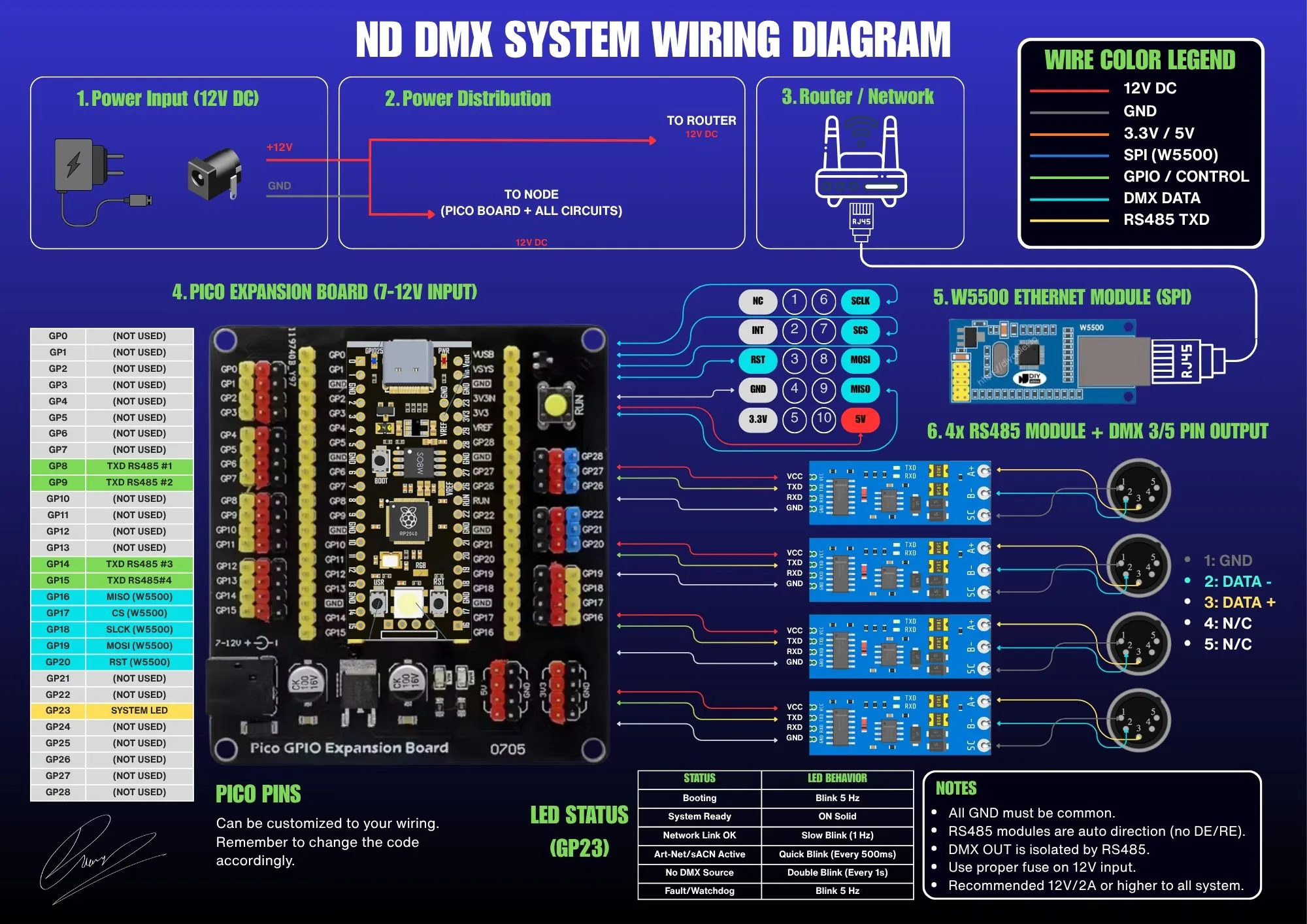
Designed for People Working on Set
Unlike many DIY DMX projects that focus solely on transmitting data, ND PicoDMX System was designed around the needs of people actually working on set. Whether you're a Director of Photography, a Gaffer, or a Lighting Programmer, having visibility into your lighting network can save valuable time during setup and troubleshooting. A single disconnected cable, an incorrect universe assignment, or unstable network traffic can quickly become a costly delay when an entire crew is waiting.
1. A Live Dashboard for Faster Troubleshooting
That's why the project includes a modern browser-based dashboard that works from virtually any device on the same network. Without installing additional software, users can monitor live Art-Net and sACN traffic, verify active universes, inspect output status, review network information, and configure the node in real time. The interface was designed to be clean, responsive, and immediately understandable, even under the pressure of a busy production schedule.
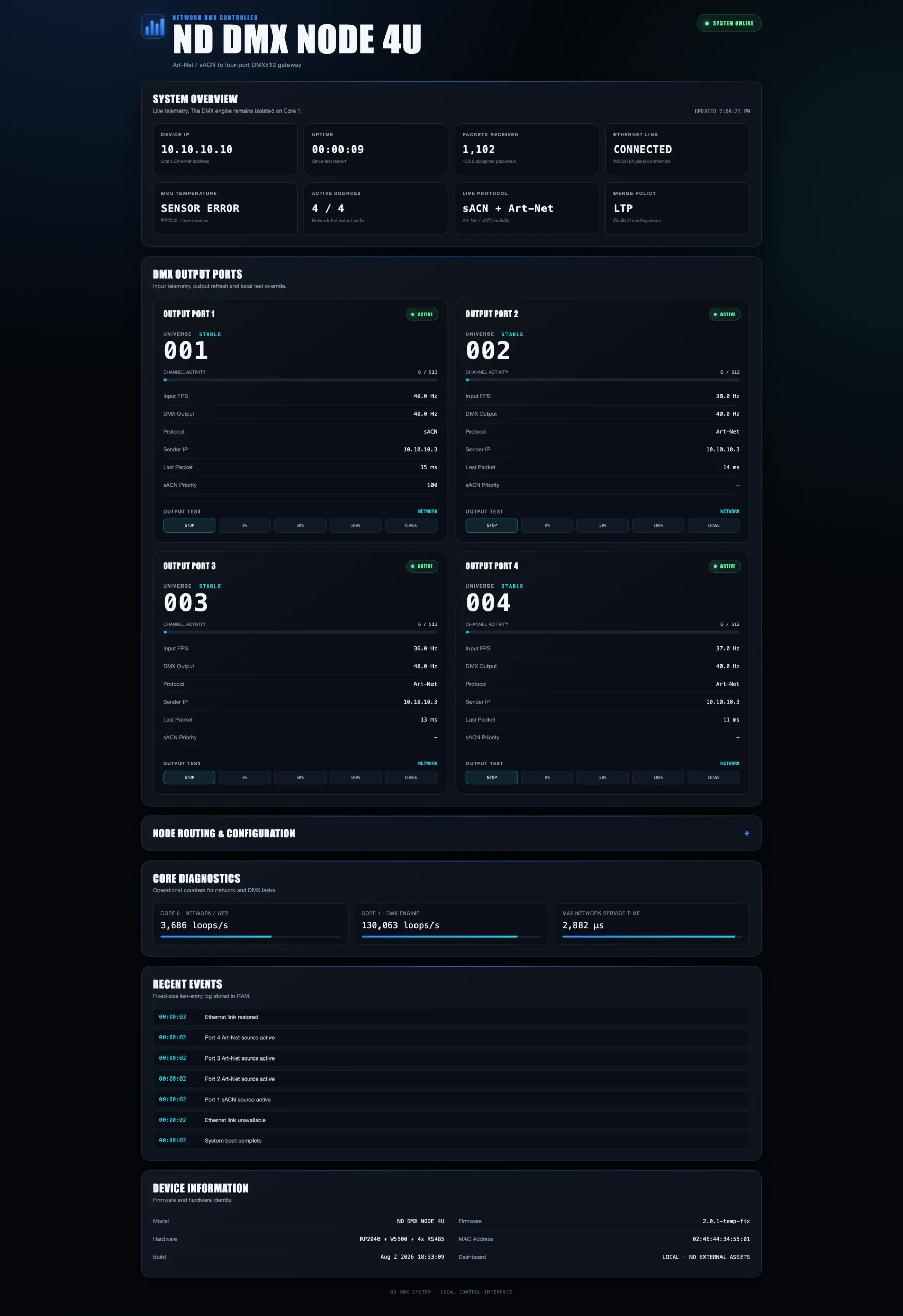
Greater Confidence for DOPs
For DOPs, this means greater confidence that lighting cues are reaching the intended fixtures before the camera starts rolling. During complex lighting setups involving multiple universes, practical fixtures, pixel devices, or wireless DMX systems, the dashboard provides instant confirmation that the network is behaving as expected. Instead of wondering whether an issue originates from the console, the network, or the node itself, the information is available in a single place.
More Reliability for Gaffers
For Gaffers, reliability is often just as important as creative flexibility. Time spent diagnosing technical problems is time taken away from shaping light. ND PicoDMX System was built to minimize that friction by providing live diagnostics that help identify network issues quickly, reducing unnecessary downtime and allowing the lighting department to stay focused on the creative process.
2. Open-Source and Adaptable
Because the project is fully open-source, users are free to adapt it to their own workflow. Whether integrating it into permanent installations, custom lighting rigs, virtual production environments, or portable production kits, the firmware can be modified, extended, and optimized without being locked into a proprietary ecosystem. Every production is different, and the tools should be flexible enough to evolve alongside those changing requirements.
Professional Tools Without the Premium Price
One of the ideas that guided this project from the beginning was that professional tools don't always have to come with professional price tags. Accessibility encourages experimentation, learning, and innovation. Students, independent filmmakers, rental houses, and experienced lighting technicians alike should be able to understand how their tools work, not just use them.
3. A Practical Open-Source Lighting Platform
ND PicoDMX System is my contribution toward that philosophy: a reliable, budget-friendly, browser-controlled Art-Net and sACN node designed for modern lighting workflows. It demonstrates that open-source hardware can be practical enough for production while remaining approachable for anyone interested in building, learning, and improving the technology behind professional lighting control.
GUIDE TO FLASHING FIRMWARE (.UF2) FOR BEGINNERS
- Disconnect the power / USB cable of the Raspberry Pi Pico from your computer.
- Press and hold the
BOOTSEL button on the Raspberry Pi Pico board. - While holding the
BOOTSEL button, plug in the USB cable to connect the Pico to your computer. - Release the
BOOTSEL button. Your computer will recognize the Pico as a new USB drive named RPI-RP2. - Drag and drop (or Copy & Paste) the
ND_DMX_NODE_4U_v2_1_STABLE.ino.uf2 file onto the RPI-RP2 drive. - The drive will automatically disappear, and the Pico will reboot and immediately start running the ND PicoDMX v2.1 system.
BOOTSEL button on the Raspberry Pi Pico board.BOOTSEL button, plug in the USB cable to connect the Pico to your computer.BOOTSEL button. Your computer will recognize the Pico as a new USB drive named RPI-RP2.ND_DMX_NODE_4U_v2_1_STABLE.ino.uf2 file onto the RPI-RP2 drive.v2.1
August 12, 2026🚀 1.3 OLED Screen Update
Added
- 1.3-inch OLED Hardware UI: Integrated SH1106 I2C display driven by rotary encoder and dedicated Confirm/Back buttons.
- Hierarchical Tree Menu Navigation: Redesigned screen state machine into a clean, multi-level tree structure (`Home` -> `Main Menu` -> `Sub-menus`) using monospaced terminal typography.
On-Device Pages & Features:
- Home: Live IP, link status, and system uptime.
- Ports: Active/Standby status and dedicated per-port detail views (Universe, FPS, Mode).
- Network: Live IP, Subnet Mask, Link speed, and connection status.
- DMX Settings: View assigned Universes, Start Address, and Protocol per port.
- Test Mode: Hardware output override (Blackout, Full, 50%, Chase) directly from the node.
- System Info: Core 1 DMX engine loop diagnostic counters and firmware status.
- System Controls: Dedicated Reboot confirmation and a 3-second hold action for Factory Reset.
- Burn-in & Wake-up Protection: Added a 60-second screen timeout that wakes instantly without accidental menu triggers.
v2.0.2
August 5, 2026🚀 Stability & Performance Update
New
- Automatic recovery if the DMX engine unexpectedly stops.
- More reliable system uptime tracking.
- Dashboard restores the latest uptime after refreshing the browser.
Improved
- Significantly improved overall firmware stability.
- Faster loading Web Dashboard.
- Reduced dashboard size for quicker loading.
- Improved DMX synchronization and packet handling.
- More reliable Art-Net and sACN communication.
Removed
- Removed MCU temperature monitoring.
- Removed experimental firmware components from previous test builds.
v2.0.1
August 1, 2026✨ Dashboard & Diagnostics Update
Added
- Brand new industrial-style Web Dashboard.
- Real-time DMX Output FPS monitoring.
- Network Packet FPS monitoring.
- Source Quality indicator.
- Last Packet Age indicator.
- Event Log panel.
- DMX Output Test Modes.
- Channel Activity visualization.
- Device Information section.
- Firmware Version display.
Improved
- Cleaner and easier-to-read interface.
- Better dashboard responsiveness.
- Improved REST API.
- Enhanced system diagnostics.
Fixed
- Dashboard rendering issues.
- Temperature reading reliability.
- API synchronization improvements.
v2.0.0
May 30, 2026🎉 Initial Public Release
Features
- 4-Port Art-Net / sACN to DMX Node.
- Raspberry Pi Pico platform.
- W5500 Ethernet support.
- Browser-based configuration interface.
- Independent real-time DMX outputs.
- Automatic source detection.
- Network diagnostics.
- Merge Mode support.
- Watchdog protection.
Performance
- Up to 4 DMX Universes.
- Approximately 40 FPS refresh rate.
- Low-latency Ethernet processing.
4. The Future of ND PicoDMX System
As the project continues to evolve, I plan to expand its capabilities with additional diagnostics, performance optimizations, and production-focused features. My goal isn't simply to build another DMX node, it's to create a platform that grows alongside the people who use it, supporting the demanding environments where great lighting helps tell great stories.
Back To Top